CSS媒體類型詳細(xì)介紹
作者:管理員 來(lái)源:互聯(lián)網(wǎng) 發(fā)布時(shí)間:2025-12-11 10:30:16 點(diǎn)擊數(shù):0
一、什么是媒體類型
CSS媒體類型(Media Types)是CSS2規(guī)范中定義的,用于指定樣式表針對(duì)的輸出設(shè)備類型。它們?cè)试S開(kāi)發(fā)者針對(duì)不同的設(shè)備或媒體類型應(yīng)用不同的樣式規(guī)則。
二、主要媒體類型列表
1. all
適用于所有設(shè)備
@media all {
  body { font-family: Arial, sans-serif; }
}
2. screen
主要用于彩色計(jì)算機(jī)屏幕(最常用)
@media screen {
  body { background-color: #f5f5f5; }
}
3. print
用于打印和打印預(yù)覽
@media print {
  /* 打印時(shí)隱藏不必要的元素 */
  .advertisement, .sidebar { display: none; }

  /* 設(shè)置打印顏色和字體 */
  body { color: black; font-size: 12pt; }

  /* 確保鏈接在打印時(shí)顯示URL */
  a:after { content: " (" attr(href) ")"; }
}
4. speech
適用于語(yǔ)音合成器、屏幕閱讀器等發(fā)聲設(shè)備
@media speech {
  /* 為屏幕閱讀器提供更好的體驗(yàn) */
  .visually-hidden {
    clip-path: none !important;
    position: static !important;
  }
}
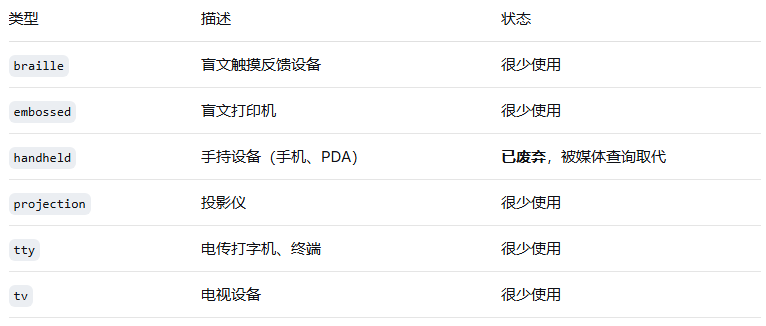
5. 其他歷史媒體類型(已廢棄或不常用)
三、使用方法
1. 在link標(biāo)簽中使用
<link rel="stylesheet" media="screen" href="screen.css">
<link rel="stylesheet" media="print" href="print.css">
<link rel="stylesheet" media="screen, print" href="common.css">
2. 在CSS中使用@import
@import url("screen.css") screen;
@import url("print.css") print;
3. 在CSS中使用@media規(guī)則
/* 基本用法 */
@media screen {
  body { font-size: 16px; }
}

@media print {
  body { font-size: 12pt; }
}

/* 同時(shí)指定多個(gè)媒體類型 */
@media screen, print {
  h1 { color: #333; }
}
四、媒體類型與媒體查詢
CSS3引入了媒體查詢(Media Queries),擴(kuò)展了媒體類型的功能,使其更加強(qiáng)大和實(shí)用:
/* CSS2的媒體類型 */
@media screen { ... }

/* CSS3的媒體查詢 - 更精細(xì)的控制 */
@media screen and (min-width: 768px) { ... }
@media screen and (max-width: 767px) and (orientation: portrait) { ... }
五、實(shí)際應(yīng)用示例
打印樣式設(shè)計(jì)
/* 打印樣式表 */
@media print {
  * {
    background: transparent !important;
    color: #000 !important;
    text-shadow: none !important;
  }

  /* 調(diào)整布局 */
  body {
    width: 100% !important;
    margin: 0 !important;
    padding: 0 !important;
  }

  /* 隱藏不必要的內(nèi)容 */
  nav, .sidebar, .ad-banner, .social-share {
    display: none !important;
  }

  /* 優(yōu)化打印分頁(yè) */
  h1, h2, h3, h4 {
    page-break-after: avoid;
  }

  img, table, figure {
    page-break-inside: avoid;
  }

  /* 顯示鏈接URL */
  a {
    text-decoration: underline;
  }

  a[href^="http"]:after {
    content: " (" attr(href) ")";
  }

  /* 打印頁(yè)眉頁(yè)腳 */
  @page {
    margin: 2cm;
    @top-center {
      content: "文檔標(biāo)題";
    }
    @bottom-right {
      content: counter(page);
    }
  }
}
針對(duì)屏幕閱讀器的優(yōu)化
@media speech {
  /* 隱藏純視覺(jué)裝飾 */
  .icon:before {
    content: "" !important;
  }

  /* 為屏幕閱讀器提供更清晰的結(jié)構(gòu) */
  .visually-hidden {
    clip-path: none;
    position: static;
    width: auto;
    height: auto;
    margin: 0;
  }

  /* 控制語(yǔ)音屬性 */
  .important {
    voice-pitch: high;
    voice-rate: slow;
  }

  .aside {
    voice-family: female;
    voice-pitch: medium;
  }
}
六、最佳實(shí)踐
始終包含print媒體類型:為網(wǎng)站創(chuàng)建打印友好的版本
使用邏輯運(yùn)算符組合條件:
@media only screen and (min-width: 320px) and (max-width: 767px) { ... }"only"關(guān)鍵字:用于隱藏舊瀏覽器中的樣式表
@media only screen and (min-width: 768px) { ... }移動(dòng)優(yōu)先設(shè)計(jì):
/* 基礎(chǔ)樣式 - 移動(dòng)設(shè)備 */
body { font-size: 14px; }

/* 平板設(shè)備 */
@media screen and (min-width: 768px) {
  body { font-size: 16px; }
}

/* 桌面設(shè)備 */
@media screen and (min-width: 1024px) {
  body { font-size: 18px; }
}
七、瀏覽器支持
所有現(xiàn)代瀏覽器都支持主要的媒體類型(all, screen, print)
speech媒體類型支持有限,主要與屏幕閱讀器相關(guān)
廢棄的媒體類型(如handheld)在現(xiàn)代瀏覽器中可能不被識(shí)別
上一篇:網(wǎng)站設(shè)計(jì):首頁(yè)要不要“塞滿”?
下一篇:網(wǎng)頁(yè)設(shè)計(jì)中的留白藝術(shù)
相關(guān)內(nèi)容: